
 The news rags are online pointing fingers about who is to blame for the latest Windows issue nicknamed the blacK Screen Of Death (KSOD). Microsoft says it’s not a patch issue, Prevx apologized for initially blaming a patch. All I know for sure is that people want it fixed.
Oddly enough, about 10 minutes after reading the news I got a call from a client about a workstation exhibiting similar problems:
- No desktop icons
- No taskbar or start menu
- Solid background (no wallpaper)
I’m not 100% certain that this is the same issue in the KSOD reports in the news, but it sounds similar.
WHAT DIDN’T WORK FOR ME
- Launching Explorer.exe from the Task Manager
- System Restore
WHAT DID WORK FOR ME
- Rebooted the PC in normal mode and logged in as Administrator
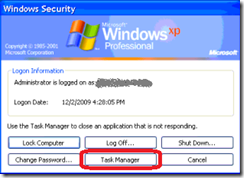
- Ctrl-Alt-Del / Task Manager
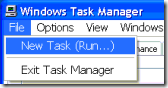
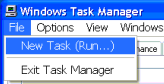
- File | New Task (Run)
- Click Browse and browse to:
"C:\Program Files\Internet Explorer\iexplore.exe"
Click OK
- When Internet Explorer opened, went to the following URL and downloaded SuperAntiSpyware:
http://www.superantispyware.com/ - Installed SuperAntiSpyware, ran a scan and it found the following results:

- I let SuperAntiSpyware remove that trojan, rebooted, logged back in and the desktop icons, start menu and taskbar were working again.



Here is the item that SuperAntiSpyware quarantined:
HKLM\SOFTWARE\Microsoft\Windows NT\CurrentVersion\Image File Execution Options\explorer.exe (Debugger – C:\Program Files\Microsoft Common\svchost.exe)
Again, I’m not saying for certain that this is the same issue others are reporting, but I wanted to pass along what I found in case others see similar issues. This is what worked for me – your mileage may vary.
UPDATE 12/2/2009:
Here is the link to the Prevx KSOD cleanup tool (I haven’t tried it though):
http://www.prevx.com/blog/140/Black-Screen-woes-could-affect-millions-on-Windows–Vista-and-XP.html